Skip to product information
1 of 4

H109 Foldable Drone with HD Camera & Obstacle Avoidance for Kids

H109 Foldable Drone with HD Camera & Obstacle Avoidance for Kids

Regular price $116.26 USD
Regular price $189.69 USD Sale price $116.26 USD
Sale Sold out

💰 You Save: $73.43 (38%)

🚚 Free Worldwide Shipping – No Minimum!

Color
$1.00 from your order total goes to support

Help to protect the world's most vulnerable animals, places and people

H109 Mini Drone with Dual Camera, Four-Direction Obstacle Support, and Foldable Design

Short practice flights become more interesting when a mini drone gives you more than one way to frame the scene. The H109 keeps the foldable body easy to carry while adding front-and-bottom camera switching, four-direction obstacle support, Wi-Fi FPV preview, one-key controls, and bright LED lighting for casual open-area flying.

Its best role is beginner-friendly recreational use: simple to launch, flexible enough for everyday perspective changes, and realistic about small-drone limits in wind, cluttered spaces, and low light.

Quick Highlights

  • Dual-camera switching in a foldable mini drone: Front and bottom camera views make short practice flights and casual framing more flexible than a basic single-view starter drone.
  • Easier open-area practice: One-key controls, headless mode, speed settings, and four-direction obstacle support help new pilots manage slower recreational flights with more awareness.
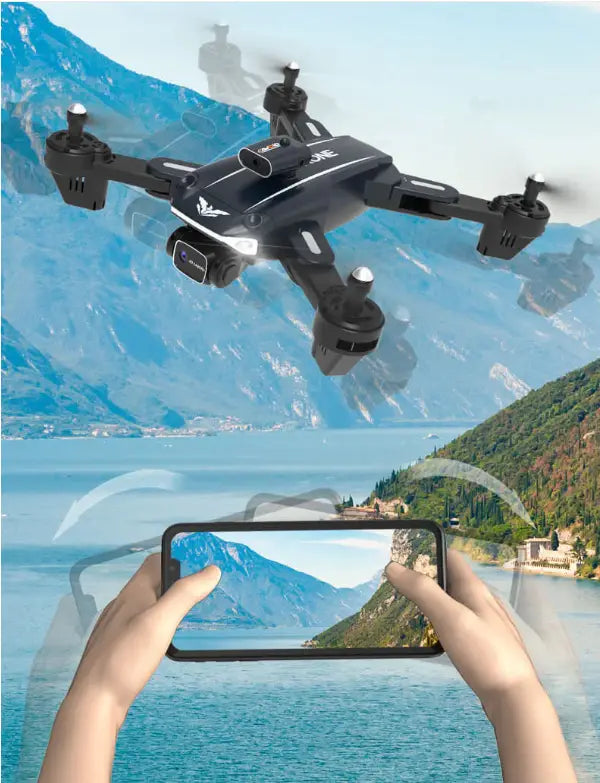
  • App-linked flying and sharing: Wi-Fi FPV preview, path drawing, gravity-sensing control, gesture capture, and media saving support everyday flying and quick sharing.
  • Reality-calibrated support features: Obstacle support, AI target recognition, and long-press return should be treated as helpful aids, not replacements for careful piloting.

Key Features

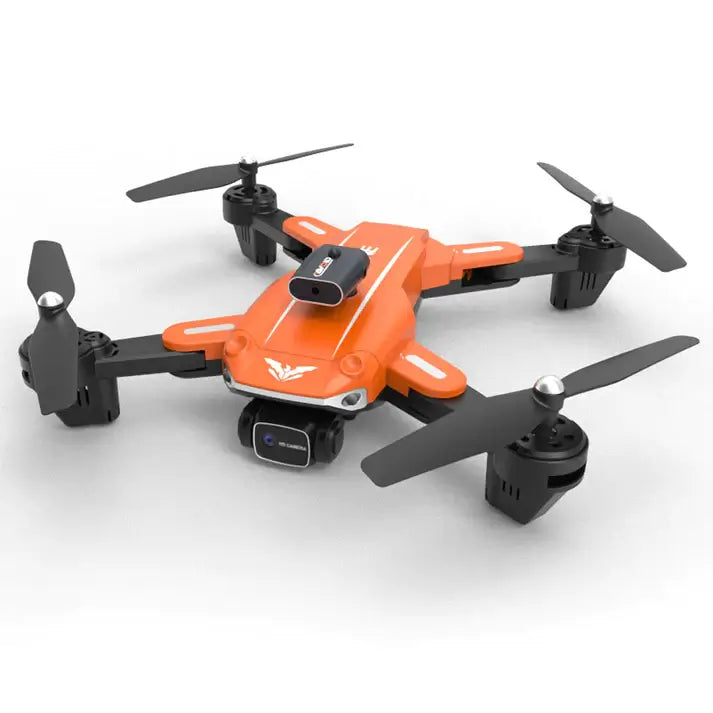
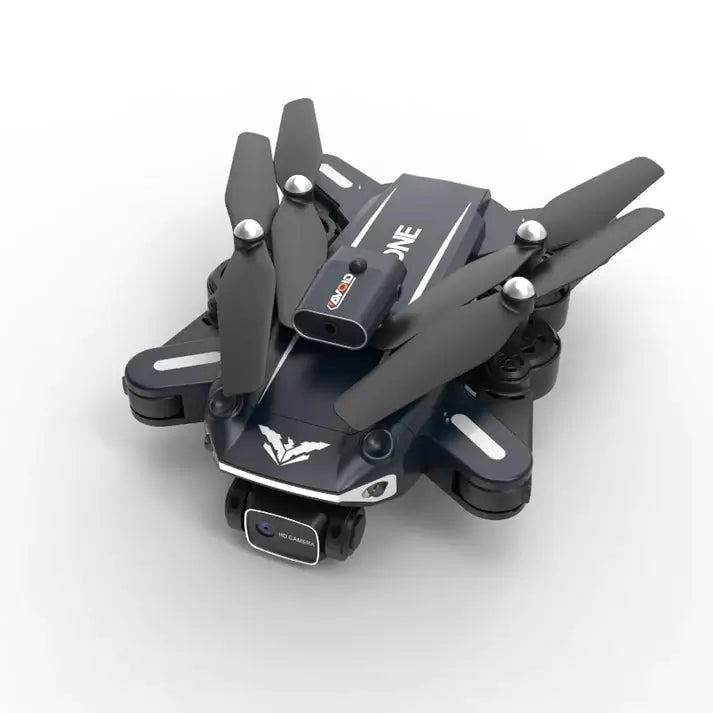
  • Foldable travel-friendly body with crash-resistant shell: The H109 is easy to carry for parks, garden sessions, and short outdoor trips while keeping a compact everyday format for beginners and casual users.
  • Dual-camera switching for flexible everyday framing: The drone gives you front and bottom camera views with easy switching for simple perspective changes during practice flights, family outings, and casual aerial snapshots. Its 4K dual-camera setup is best treated as an everyday capture feature rather than a premium filming platform.
  • Four-direction obstacle support for slower recreational flights: This feature works best as a close-range flight aid in calmer, slower flying. It can help reduce simple bumps, but it is not a universal automatic protection system.
  • Easy controls that reduce the learning curve: One-key takeoff, one-key landing, headless mode, speed settings, flips, and app-linked controls help first-time users get started more easily in open spaces and calmer conditions. If your version includes long-press return, use it as a basic control aid rather than a replacement for careful piloting.
  • AI imaging and app-linked sharing tools: AI target recognition, AI photo auto-optimisation, Wi-Fi FPV preview, gesture capture, gravity-sensing control, path drawing, LED control, and easy media saving add more flexibility for everyday flying and quick sharing.
FAQ

What kind of camera experience should I expect from this model?

The H109 is best suited to casual aerial snapshots, everyday clips, and flexible front-and-bottom viewing rather than premium filming work. Its dual-camera setup makes it easier to explore simple perspective changes during practice flights and family use.

What is the difference between FPV live view and saved media?

Wi-Fi FPV preview helps with framing and flight reference while you fly. Saved photos and videos are your final media outputs, so live preview should not be treated as the same layer as stored media.

How does obstacle support help during everyday use?

The H109 uses four-direction obstacle detection that works best as a close-range flight aid during slower recreational flights. It can help reduce simple bumps, but it should not be treated as universal automatic collision prevention, especially in bright light, reflective areas, or more complex outdoor spaces.

How should I understand AI target recognition and photo optimisation?

AI target recognition and AI photo auto-optimisation are best treated as app-assisted support features for simple framing and casual sharing. They should not be understood as professional subject tracking, autonomous intelligence, or high-end image processing.

How do one-key controls and beginner modes make flying easier?

One-key takeoff, one-key landing, headless mode, and simple short-range control options help first-time users get started more easily. They work best in open areas where you can keep the drone clearly in view.

What runtime and control range should I expect?

The H109 runs for about 12 to 15 minutes per battery in suitable conditions. Remote distance reaches up to 150 meters, approximately 492 feet. Wind, surroundings, and flying style can reduce real-world performance.

Do I need a phone to use the H109?

No. The H109 can be flown with the remote controller, but a phone becomes useful when you want FPV preview, gesture capture, path drawing, gravity-sensing control, and easier media sharing.

Honest Guide

What this model is built for

The H109 is a foldable mini drone for short recreational flights, beginner practice, and casual everyday aerial content. Its strengths are portability, simple controls, dual-camera angle switching, and a playful mix of app-linked features.

How to think about the camera

The camera system is best positioned as flexible casual-use capture rather than high-end production hardware. The H109 makes more sense for everyday snapshots, short clips, and practice flying than for premium large-screen filming.

Live preview and saved media do different jobs

Wi-Fi FPV preview is there to help with framing and flight reference while you fly. Saved photos and videos are your final outputs, so they should be understood separately from the live preview view on your phone.

Where it works best

The H109’s natural role is open-space practice, calm-condition flying, family-friendly outings, and short sessions where dual-camera switching and simple controls matter more than premium filming performance.

Where it has limits

Strong wind, crowded areas, high-speed outdoor flying, advanced stabilisation, and dependable autonomous tracking are outside the H109’s natural role.

Flight-aid and environment limits

Four-direction obstacle detection should be treated as a flight aid, not as guaranteed all-direction protection. Brighter light, reflective surfaces, cluttered surroundings, and more complex outdoor spaces can reduce consistency.

AI and app-tool expectations

AI target recognition, AI photo auto-optimisation, gesture capture, path drawing, and gravity-sensing control are casual app-linked support tools. They can make everyday flying more flexible, but they do not turn the H109 into an autonomous tracking drone.

LED light expectations

Bright LED night lights can support visibility awareness and a more playful flying look. They do not remove the need for open surroundings, low-and-slow control, and careful judgment in darker conditions.

Simple comparison

Stronger wind handling, more advanced stabilisation, and higher-end filming confidence point toward a more premium drone. The H109 points toward everyday flying, simple camera switching, LED-supported visibility, and app-linked fun in a compact foldable body.

The H109 lands best as a compact dual-view practice drone: easy to carry, simple to start, and more flexible for everyday framing than a very basic mini drone.

What’s in the Box
  • H109 drone: 1
  • Remote controller: 1
  • Modular body battery: 1
  • Protective frame: 1
  • Propeller blades: 4
  • Screwdriver: 1
  • USB charging cable: 1
  • User manual: 1
  • App manual: 1
Technical Specifications

Product format

  • Model: H109
  • Type: Foldable mini drone
  • Body: Foldable crash-resistant shell

Size and weight

  • Unfolded size: 30 × 30 × 5 cm
  • Folded size: 18 × 13 × 7.5 cm
  • Weight: About 137.5 g, including battery
  • Operating temperature: 0–40°C

Camera and imaging

  • Camera system: Dual-camera layout
  • Camera views: Front and bottom
  • Camera switching: Supported
  • Camera setup: 4K dual-camera positioning
  • Live Preview Transmission: 2.4 GHz Wi-Fi FPV to phone
  • Image tools: AI target recognition, AI photo auto-optimisation, and gesture photo and video

Flight assistance

  • Obstacle support: Four-direction obstacle detection
  • Environmental sensing support: Broader multi-side awareness for close-range flight assistance
  • Orientation support: Headless mode
  • Beginner controls: One-key takeoff and one-key landing
  • Return function: Long-press return, standard version only

Controls and flight modes

  • Control methods: Remote controller and mobile app
  • Mobile platforms: iOS and Android
  • Flight tools: Path drawing and gravity-sensing control
  • Speed modes: Slow, Medium, and Fast
  • Flips: 360-degree flips in four directions
  • LED control: Supported by app or controller

Battery and performance

  • Flight time: 12 to 15 minutes
  • Battery: 3.7 V 2000 mAh modular battery
  • Charging time: About 60 minutes
  • Remote distance: Up to 150 meters, approximately 492 feet

Build and lighting

  • Lighting: Bright LED night lights

Media workflow and certification

  • Media saving: App-linked saving for easy sharing
  • Storage workflow: Media can be stored locally or through your preferred cloud workflow
  • Certification: CE
Unlock All Features
  • Front-and-bottom camera switching: Changes perspectives during everyday flying.
  • AI target recognition: Adds simple subject-recognition support for casual framing.
  • AI photo auto-optimisation: Supports quick image adjustment for casual sharing.
  • Gesture photo and video: Makes hands-free capture easier during playful use.
  • Path drawing flight: Lets you draw a route in the app for guided flight.
  • Gravity-sensing control: Lets you steer by tilting your phone.
  • Speed modes: Switch between slower learning flights and faster recreational fun.
  • 360-degree flips: Add a simple stunt mode for recreational flying fun.
  • LED control: Adjusts the night lights through the app or controller for visibility awareness.
  • Wi-Fi FPV sharing workflow: Helps you preview live video on your phone and save media for easy sharing.
Fly Safe & Legal

Fly in open areas away from people, trees, wires, walls, and reflective surfaces.

Keep the drone within visual line of sight at all times.

Four-direction obstacle support is a flight aid, not a guarantee against collisions.

Fly low and slow in low-light or indoor settings.

Always check local rules and no-fly zones before takeoff.

If your version includes long-press return, use it as a basic control aid rather than as a replacement for careful piloting.

View full details